
API Testing with Playwright
What Is an API?
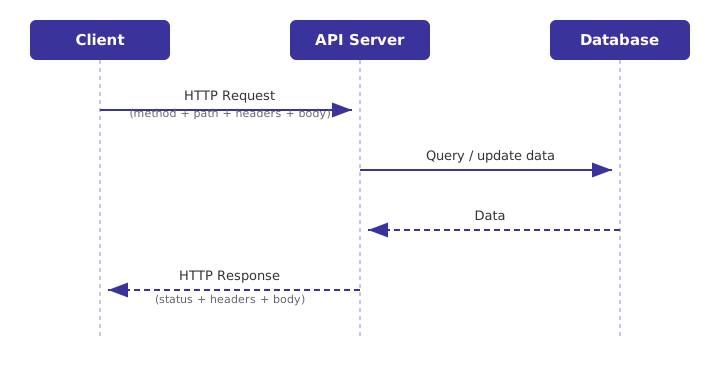
An API (Application Programming Interface) is a contract that lets one piece of software talk to another — without either side needing to know the other's internal code. A client (browser, mobile app, test script) sends a request; a server processes it and sends back a response.
Common API styles:
| Style | Description |
|---|---|
| REST | Resources over HTTP, uses standard methods (GET/POST/PUT/PATCH/DELETE) |
| GraphQL | Single endpoint, client specifies exactly the fields it needs |
| SOAP | XML-based, strict contracts (WSDL), common in legacy enterprise systems |
| gRPC | Binary protocol over HTTP/2, used for fast service-to-service calls |
This guide focuses on REST APIs, the most common style you'll test.
What Is REST?
REST (Representational State Transfer) is a set of conventions for designing APIs around resources (nouns, not actions), identified by URLs, and manipulated using standard HTTP methods.
GET /users → list users
GET /users/42 → get one user
POST /users → create a user
PUT /users/42 → replace a user
PATCH /users/42 → partially update a user
DELETE /users/42 → delete a user
Core REST principles:
- Stateless — each request contains all information needed; the server doesn't store client session state between calls.
- Resource-based URLs —
/users/42/orders, not/getUserOrders?id=42. - Standard methods — behavior is defined by the HTTP verb, not the URL.
- Representations — resources are usually returned as JSON (sometimes XML).
What Is HTTP and HTTPS?
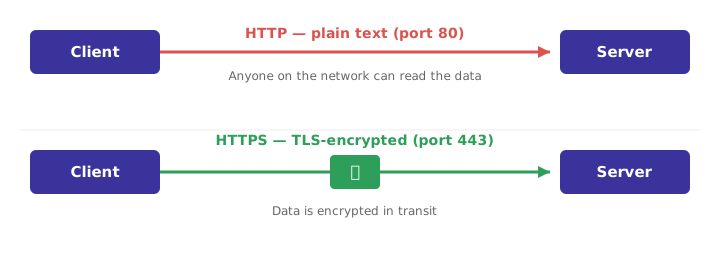
HTTP (HyperText Transfer Protocol) is the protocol used to exchange requests and responses between clients and servers. It's plain text and unencrypted.
HTTPS is HTTP over TLS/SSL — the same protocol, but encrypted in transit. All modern and production APIs should use HTTPS so credentials, tokens, and data can't be read or tampered with on the network.
| HTTP | HTTPS | |
|---|---|---|
| Port | 80 | 443 |
| Encryption | None | TLS/SSL |
| Data exposed on network | Yes | No |
| Use in production | Avoid | Required |
HTTP Methods
| Method | Purpose | Idempotent? | Safe? | Has body? |
|---|---|---|---|---|
| GET | Read a resource | Yes | Yes | No |
| POST | Create a resource / trigger an action | No | No | Yes |
| PUT | Replace a resource entirely | Yes | No | Yes |
| PATCH | Partially update a resource | No* | No | Yes |
| DELETE | Remove a resource | Yes | No | Usually no |
| HEAD | Like GET, headers only (no body) | Yes | Yes | No |
| OPTIONS | Discover allowed methods/CORS preflight | Yes | Yes | No |
- Safe = doesn't modify server state. Idempotent = calling it multiple times has the same effect as calling it once.
- *PATCH can be made idempotent depending on implementation.
Anatomy of a Request and Response
POST /api/users HTTP/1.1
Host: api.example.com
Authorization: Bearer eyJhbGciOi...
Content-Type: application/json
Accept: application/json
{
"name": "Jane Doe",
"email": "jane@test.com"
}
HTTP/1.1 201 Created
Content-Type: application/json
Location: /api/users/42
{
"id": 42,
"name": "Jane Doe",
"email": "jane@test.com"
}
- Start line — method + path (request) or status code + text (response).
- Headers — metadata about the message.
- Body — the actual payload (optional for GET/DELETE, common for POST/PUT/PATCH).
Request/Response Body: JSON vs XML
JSON is the default for modern REST APIs — lightweight, native to JavaScript, easy to read.
{
"id": 42,
"name": "Jane Doe",
"active": true,
"roles": ["admin", "editor"],
"address": {
"city": "Austin",
"zip": "78701"
}
}
XML is still used in older/enterprise systems (SOAP, some banking/government APIs).
<user>
<id>42</id>
<name>Jane Doe</name>
<active>true</active>
<roles>
<role>admin</role>
<role>editor</role>
</roles>
<address>
<city>Austin</city>
<zip>78701</zip>
</address>
</user>
| JSON | XML | |
|---|---|---|
| Size | Smaller | More verbose |
| Readability | Simple | More structured/schema-heavy |
| Native JS support | Yes | No (needs parsing) |
| Schema validation | JSON Schema | XSD |
| Common today | Most REST APIs | SOAP, legacy systems |
Headers
Headers are key-value metadata sent with a request or response — they describe the message but aren't part of the actual resource data.
Common Request Headers
| Header | Purpose |
|---|---|
Authorization | Credentials — Bearer <token>, Basic <base64>, API key, etc. |
Content-Type | Format of the request body — e.g. application/json |
Accept | Format the client wants back — e.g. application/json |
User-Agent | Identifies the calling client/app |
X-Request-ID / X-Correlation-ID | Trace a request across services/logs |
Cache-Control | Caching directives (e.g. no-cache) |
Cookie | Session data sent by the client |
Common Response Headers
| Header | Purpose |
|---|---|
Content-Type | Format of the response body |
Content-Length | Size of the response body in bytes |
Set-Cookie | Server sets session/cookie data |
Location | URL of a newly created resource (used with 201 Created) |
X-RateLimit-Limit / Remaining / Reset | Rate limiting info |
ETag | Version identifier for caching/conditional requests |
Retry-After | How long to wait before retrying (used with 429/503) |
Authentication Methods
Basic Auth
Username and password, base64-encoded (not encrypted — always use over HTTPS).
Authorization: Basic am9objpwYXNzd29yZA==
base64("john:password") → "am9objpwYXNzd29yZA=="
Token / Bearer Auth
A pre-issued token (often a JWT) is sent with every request.
Authorization: Bearer eyJhbGciOiJIUzI1NiIsInR5cCI6IkpXVCJ9...
API Key
A static key issued per client/application, sent as a header or query param.
X-API-Key: 3f9a1c2e-...
OAuth 2.0
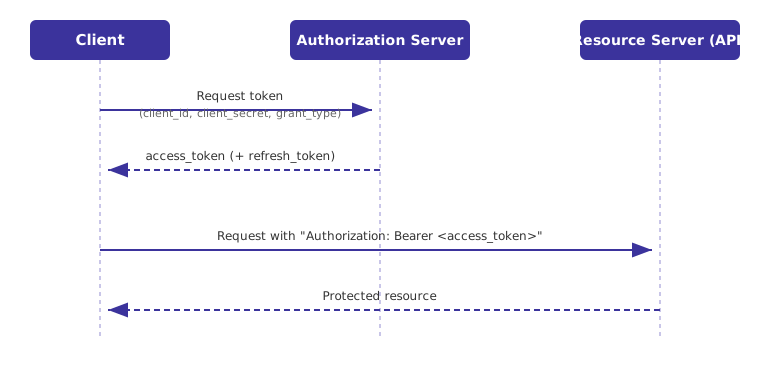
A delegated authorization flow — the client exchanges credentials for an access token from an authorization server, then uses that token to call the API.
Common grant types:
| Grant Type | Used For |
|---|---|
| Client Credentials | Service-to-service (no user involved) |
| Authorization Code | Web/mobile apps with a user login |
| Refresh Token | Getting a new access token without re-authenticating |
| Method | Where credentials live | Typical use |
|---|---|---|
| Basic Auth | Username/password every request | Simple internal APIs, dev/test environments |
| Token/Bearer | Pre-issued token | Most modern REST APIs |
| API Key | Static key per client | Public APIs, third-party integrations |
| OAuth 2.0 | Short-lived token from an auth server | Enterprise APIs, third-party access on behalf of a user |
Response (Status) Codes
| Range | Meaning | Examples |
|---|---|---|
| 2xx | Success | 200 OK, 201 Created, 204 No Content |
| 3xx | Redirection | 301 Moved Permanently, 304 Not Modified |
| 4xx | Client error | 400 Bad Request, 401 Unauthorized, 403 Forbidden, 404 Not Found, 429 Too Many Requests |
| 5xx | Server error | 500 Internal Server Error, 502 Bad Gateway, 503 Service Unavailable |
Putting It Together: A Full Example
POST /api/orders HTTP/1.1
Host: api.example.com
Authorization: Bearer eyJhbGciOi...
Content-Type: application/json
Accept: application/json
{
"productId": 101,
"quantity": 2
}
HTTP/1.1 201 Created
Content-Type: application/json
Location: /api/orders/555
{
"orderId": 555,
"productId": 101,
"quantity": 2,
"status": "pending"
}
This is the request/response the rest of this guide builds on — starting with setting up Playwright to send it and assert on it.
## System Requirements
Node.js: latest 20.x, 22.x or 24.x.
Windows 11+, Windows Server 2019+
macOS 14 (Ventura) or later.
Debian 12 / 13, Ubuntu 22.04 / 24.04 (x86-64 or arm64)
## Install Playwright with TypeScript
npm init playwright@latest
# Install manually
npm install -D @playwright/test
npm install -D typescript
npx playwright install
## Why Playwright for API Testing?
- Built-in `APIRequestContext` — no extra HTTP client library needed (no axios/supertest required).
- Same test runner, same config, same CI pipeline as your E2E tests.
- Can mix API calls with browser actions in a single test (seed data via API, verify via UI).
- Automatic cookie/session handling when reusing a browser context's request object.
## Minimal API Test
import { test, expect } from '@playwright/test';
test('get user returns 200', async ({ request }) => {
const response = await request.get('https://api.example.com/users/42');
expect(response.ok()).toBeTruthy();
});
## Run it:
npx playwright test
## Recommended Folder Structure
├── tests/
│ ├── api/
│ │ ├── users.api.spec.ts
│ │ ├── orders.api.spec.ts
│ │ └── auth.setup.ts
│ ├── e2e/
│ │ └── checkout.spec.ts
├── fixtures/
│ └── api-fixtures.ts
├── schemas/
│ └── user-schema.json
├── playwright.config.ts
├── package.json
└── tsconfig.json
## Separating API Tests from E2E Tests
// playwright.config.ts
export default defineConfig({
projects: [
{
name: 'api',
testDir: './tests/api',
use: { baseURL: 'https://api.example.com' },
},
{
name: 'e2e',
testDir: './tests/e2e',
use: { baseURL: 'https://example.com', ...devices['Desktop Chrome'] },
},
],
});
## Run only the API project:
npx playwright test --project=api
## Anatomy of an HTTP Request
GET /api/users/42?include=orders HTTP/1.1
Host: api.example.com
Authorization: Bearer eyJhbGciOi...
Content-Type: application/json
Accept: application/json
- **Method** — GET, POST, PUT, PATCH, DELETE, HEAD, OPTIONS
- **Path** — resource being addressed
- **Query params** — `?include=orders` filters/modifies the response
- **Headers** — metadata (auth, content type, tracing)
- **Body** — payload for POST/PUT/PATCH (usually JSON)
## Anatomy of an HTTP Response
HTTP/1.1 200 OK
Content-Type: application/json
X-RateLimit-Remaining: 59
{
"id": 42,
"name": "Jane Doe",
"orders": []
}
## HTTP Methods Cheat Table
Note : Idempotent = An operation is idempotent if you can perform it multiple times
and the final result is the same as performing it once
| Method | Purpose | Idempotent? | Has body? |
| GET | Read a resource | Yes | No |
| POST | Create a resource | No | Yes |
| PUT | Replace a resource entirely | Yes | Yes |
| PATCH | Partially update a resource | No* | Yes |
| DELETE | Remove a resource | Yes | Usually no |
PATCH can be made idempotent depending on implementation.
## REST Resource Naming
GET /users # list
GET /users/42 # read one
POST /users # create
PUT /users/42 # replace
PATCH /users/42 # partial update
DELETE /users/42 # delete
GET /users/42/orders # nested resource
## Making Each Method with Playwright's `request` Fixture
import { test, expect } from '@playwright/test';
test('all HTTP methods', async ({ request }) => {
// GET
const list = await request.get('/users');
expect(list.ok()).toBeTruthy();
// POST — create
const created = await request.post('/users', {
data: { name: 'Jane Doe', email: 'jane@test.com' }
});
expect(created.status()).toBe(201);
const { id } = await created.json();
// PUT — full replace
await request.put(`/users/${id}`, {
data: { name: 'Jane Smith', email: 'jane.smith@test.com' }
});
// PATCH — partial update
await request.patch(`/users/${id}`, { data: { name: 'Jane S.' } });
// DELETE
const deleted = await request.delete(`/users/${id}`);
expect(deleted.status()).toBe(204);
});
## Status Code Reference
### 2xx — Success
200 OK # standard success
201 Created # resource created (POST)
202 Accepted # accepted for async processing
204 No Content # success, empty body (DELETE)
### 3xx — Redirection
301 Moved Permanently
302 Found (temporary redirect)
304 Not Modified # cached response is still valid
### 4xx — Client Errors
400 Bad Request # malformed request / validation failed
401 Unauthorized # missing or invalid auth
403 Forbidden # authenticated but not allowed
404 Not Found
405 Method Not Allowed
409 Conflict # duplicate resource / version conflict
422 Unprocessable Entity # semantically invalid payload
429 Too Many Requests # rate limited
### 5xx — Server Errors
500 Internal Server Error
502 Bad Gateway
503 Service Unavailable
504 Gateway Timeout
## Asserting Status Codes in Playwright
typescript
import { test, expect } from '@playwright/test';
test('status code assertions', async ({ request }) => {
const ok = await request.get('/users/42');
expect(ok.status()).toBe(200);
expect(ok.ok()).toBeTruthy(); // true for any 2xx
const created = await request.post('/users', { data: { name: 'Jane' } });
expect(created.status()).toBe(201);
const deleted = await request.delete('/users/42');
expect(deleted.status()).toBe(204);
// Expect a client error without throwing
const badRequest = await request.post('/users', { data: {} });
expect(badRequest.status()).toBe(400);
expect(badRequest.ok()).toBeFalsy();
});
## Asserting Status Text & Ranges
typescript
test('status ranges', async ({ request }) => {
const response = await request.get('/users/9999');
expect(response.status()).toBeGreaterThanOrEqual(400);
expect(response.status()).toBeLessThan(500);
expect(response.statusText()).toBe('Not Found');
});
## Failing Fast on Unexpected Errors
typescript
test('throws on non-2xx if using .fetch() strictly', async ({ request }) => {
const response = await request.get('/users/42');
if (!response.ok()) {
throw new Error(`Expected success but got ${response.status()}: ${await response.text()}`);
}
});
## Basic Auth
import { test, expect } from '@playwright/test';
test('basic auth', async ({ request }) => {
const response = await request.get('/users', {
headers: {
Authorization: 'Basic ' + Buffer.from('username:password').toString('base64')
}
});
expect(response.ok()).toBeTruthy();
});
Or set it once for a whole context:
const apiContext = await request.newContext({
httpCredentials: { username: 'user', password: 'pass' }
});
## Bearer Token / JWT
test('bearer token', async ({ request }) => {
const response = await request.get('/users', {
headers: { Authorization: `Bearer ${process.env.API_TOKEN}` }
});
expect(response.ok()).toBeTruthy();
});
## API Key
const response = await request.get('/users', {
headers: { 'x-api-key': process.env.API_KEY! }
});
## OAuth2 (Client Credentials Flow)
test('oauth2 client credentials', async ({ request }) => {
const tokenResponse = await request.post('https://auth.example.com/oauth/token', {
form: {
grant_type: 'client_credentials',
client_id: process.env.CLIENT_ID!,
client_secret: process.env.CLIENT_SECRET!,
}
});
const { access_token } = await tokenResponse.json();
const response = await request.get('/users', {
headers: { Authorization: `Bearer ${access_token}` }
});
expect(response.ok()).toBeTruthy();
});
## Caching the Token Once Per Test Run (like Postman's env variable caching)
Use a global setup file so every test reuses one token instead of fetching it repeatedly.
// auth.setup.ts
import { test as setup, request } from '@playwright/test';
setup('authenticate', async () => {
const context = await request.newContext();
const res = await context.post('https://auth.example.com/oauth/token', {
form: {
grant_type: 'client_credentials',
client_id: process.env.CLIENT_ID!,
client_secret: process.env.CLIENT_SECRET!,
}
});
const { access_token } = await res.json();
// Persist token to a file, reused by every project/test
await context.storageState({ path: 'playwright/.auth/token.json' });
process.env.CACHED_TOKEN = access_token;
await context.dispose();
});
// playwright.config.ts
export default defineConfig({
projects: [
{ name: 'setup', testMatch: /auth\.setup\.ts/ },
{
name: 'api',
dependencies: ['setup'],
use: { storageState: 'playwright/.auth/token.json' },
},
],
});
## Reusable Authenticated Fixture
// fixtures/api-fixtures.ts
import { test as base, request, APIRequestContext } from '@playwright/test';
type Fixtures = { authedRequest: APIRequestContext };
export const test = base.extend<Fixtures>({
authedRequest: async ({}, use) => {
const context = await request.newContext({
baseURL: 'https://api.example.com',
extraHTTPHeaders: { Authorization: `Bearer ${process.env.API_TOKEN}` },
});
await use(context);
await context.dispose();
},
});
import { test } from '../fixtures/api-fixtures';
import { expect } from '@playwright/test';
test('uses authed fixture', async ({ authedRequest }) => {
const response = await authedRequest.get('/profile');
expect(response.ok()).toBeTruthy();
});
## Built-in `request` Fixture (per test)
import { test, expect } from '@playwright/test';
test('built-in request fixture', async ({ request }) => {
const response = await request.get('/users/42');
expect(response.ok()).toBeTruthy();
});
## Standalone Request Context (no browser/test needed)
Useful in setup scripts, seeding data, or scripts run outside the test runner.
import { request } from '@playwright/test';
const apiContext = await request.newContext({
baseURL: 'https://api.example.com',
extraHTTPHeaders: {
Authorization: `Bearer ${process.env.API_TOKEN}`,
Accept: 'application/json',
},
});
const response = await apiContext.get('/users');
console.log(await response.json());
await apiContext.dispose();
## Sharing a Context Across Multiple Tests
import { test as base, request, APIRequestContext } from '@playwright/test';
let apiContext: APIRequestContext;
const test = base.extend<{}, { workerApi: APIRequestContext }>({
workerApi: [async ({}, use) => {
apiContext = await request.newContext({ baseURL: 'https://api.example.com' });
await use(apiContext);
await apiContext.dispose();
}, { scope: 'worker' }],
});
export { test };
## Custom Fixture: Seed & Cleanup a Resource
import { test as base, expect } from '@playwright/test';
type Fixtures = { testUser: { id: number; name: string } };
export const test = base.extend<Fixtures>({
testUser: async ({ request }, use) => {
const res = await request.post('/users', { data: { name: 'Temp User' } });
const user = await res.json();
await use(user); // hand off to the test
await request.delete(`/users/${user.id}`); // cleanup after test
},
});
test('update seeded user', async ({ request, testUser }) => {
const res = await request.patch(`/users/${testUser.id}`, { data: { name: 'Updated' } });
expect(res.ok()).toBeTruthy();
});
## GET — with Query Params
test('get with query params', async ({ request }) => {
const response = await request.get('/users', {
params: { page: 2, limit: 10, active: true }
});
// -> GET /users?page=2&limit=10&active=true
expect(response.ok()).toBeTruthy();
});
## GET — with Path Params (build the URL yourself)
const userId = 42;
const response = await request.get(`/users/${userId}/orders`);
## POST — JSON Body
test('create a user', async ({ request }) => {
const response = await request.post('/users', {
data: { name: 'Jane Doe', email: 'jane@test.com' }
});
expect(response.status()).toBe(201);
const body = await response.json();
expect(body.id).toBeDefined();
});
## POST — Form-Encoded Body
const response = await request.post('/login', {
form: { username: 'admin', password: 'secret' }
});
## PUT — Full Replace
await request.put(`/users/${id}`, {
data: { name: 'Jane Smith', email: 'jane.smith@test.com' }
});
## PATCH — Partial Update
await request.patch(`/users/${id}`, { data: { name: 'Jane S.' } });
## DELETE
const response = await request.delete(`/users/${id}`);
expect(response.status()).toBe(204);
## Custom Headers Per Request
await request.get('/users', {
headers: { 'X-Request-Id': crypto.randomUUID() }
});
## Setting a Default `baseURL` (avoid repeating full URLs)
// playwright.config.ts
export default defineConfig({
use: { baseURL: 'https://api.example.com' },
});
// now this is enough:
await request.get('/users/42');
## Asserting the Response Body
import { test, expect } from '@playwright/test';
test('body assertions', async ({ request }) => {
const response = await request.get('/users/42');
const body = await response.json();
expect(body.id).toBe(42);
expect(body.name).toEqual(expect.any(String));
expect(body).toMatchObject({ id: 42, active: true });
expect(Array.isArray(body.orders)).toBe(true);
});
## Asserting Headers
test('header assertions', async ({ request }) => {
const response = await request.get('/users/42');
expect(response.headers()['content-type']).toContain('application/json');
expect(response.headers()['x-ratelimit-remaining']).toBeDefined();
});
## JSON Schema Validation
import Ajv from 'ajv';
const schema = {
type: 'object',
required: ['id', 'name', 'email'],
properties: {
id: { type: 'integer' },
name: { type: 'string', minLength: 1 },
email: { type: 'string', format: 'email' },
},
additionalProperties: false,
};
test('schema validation', async ({ request }) => {
const response = await request.get('/users/42');
const body = await response.json();
const ajv = new Ajv({ formats: { email: /^[^@]+@[^@]+\.[^@]+$/ } });
const validate = ajv.compile(schema);
expect(validate(body)).toBe(true);
});
## Comparing Against a Snapshot
test('response snapshot', async ({ request }) => {
const response = await request.get('/users/42');
const body = await response.json();
expect(body).toMatchSnapshot('user-42.json');
});
## Response Time Assertions
test('response time', async ({ request }) => {
const start = Date.now();
await request.get('/users/42');
const duration = Date.now() - start;
expect(duration).toBeLessThan(500);
});
## Single File Upload
import { test, expect } from '@playwright/test';
import fs from 'fs';
test('upload a file', async ({ request }) => {
const response = await request.post('/upload', {
multipart: {
file: fs.readFileSync('./fixtures/report.pdf'),
}
});
expect(response.ok()).toBeTruthy();
});
## Upload with Explicit Metadata
test('upload with metadata', async ({ request }) => {
const response = await request.post('/upload', {
multipart: {
file: {
name: 'report.pdf',
mimeType: 'application/pdf',
buffer: fs.readFileSync('./fixtures/report.pdf'),
},
description: 'Q1 report', // extra form field
}
});
expect(response.status()).toBe(201);
});
## Multiple Files
test('upload multiple files', async ({ request }) => {
const response = await request.post('/upload/batch', {
multipart: {
file1: fs.readFileSync('./fixtures/a.png'),
file2: fs.readFileSync('./fixtures/b.png'),
}
});
expect(response.ok()).toBeTruthy();
});
## Downloading & Verifying a File Response
test('download a file', async ({ request }) => {
const response = await request.get('/reports/latest.csv');
expect(response.ok()).toBeTruthy();
const buffer = await response.body();
expect(buffer.length).toBeGreaterThan(0);
});
Playwright lets you seed/verify data via API inside the same test as your UI actions — faster and more reliable than doing everything through the browser.
## Seed Data via API, Then Verify in the UI
import { test, expect } from '@playwright/test';
test('checkout as a pre-seeded pro user', async ({ page, request }) => {
const res = await request.post('/test-data/users', {
data: { plan: 'pro', name: 'Jane Doe' }
});
const { id } = await res.json();
await page.goto(`/users/${id}/dashboard`);
await expect(page.locator('.plan-badge')).toHaveText('Pro');
});
## Log In via API, Reuse Session in the Browser
test('use API login to skip the UI login form', async ({ page, request }) => {
const loginRes = await request.post('/login', {
data: { username: 'testuser', password: 'password123' }
});
expect(loginRes.ok()).toBeTruthy();
// Cookies set by the API call are shared with the page via the same context
await page.goto('/dashboard');
await expect(page.locator('.welcome')).toBeVisible();
});
## Verify UI Action Actually Persisted via API
test('adding item in UI is reflected via API', async ({ page, request }) => {
await page.goto('/cart');
await page.getByRole('button', { name: 'Add to Cart' }).click();
const res = await request.get('/cart');
const cart = await res.json();
expect(cart.items.length).toBeGreaterThan(0);
});
## Clean Up After UI Tests via API
test.afterEach(async ({ request }) => {
await request.delete('/test-data/cleanup');
});
## Data-Driven Tests (loop over cases)
import { test, expect } from '@playwright/test';
const cases = [
{ id: 42, expectedName: 'Jane Doe' },
{ id: 43, expectedName: 'John Smith' },
];
for (const { id, expectedName } of cases) {
test(`get user ${id}`, async ({ request }) => {
const res = await request.get(`/users/${id}`);
const body = await res.json();
expect(body.name).toBe(expectedName);
});
}
## Generating Fake Test Data
import { faker } from '@faker-js/faker';
test('create user with fake data', async ({ request }) => {
const payload = {
name: faker.person.fullName(),
email: faker.internet.email(),
};
const res = await request.post('/users', { data: payload });
expect(res.status()).toBe(201);
});
## Fixture That Creates & Tears Down Test Data
import { test as base, expect } from '@playwright/test';
type Fixtures = { seededUser: { id: number } };
export const test = base.extend<Fixtures>({
seededUser: async ({ request }, use) => {
const res = await request.post('/users', { data: { name: 'Temp' } });
const user = await res.json();
await use(user);
await request.delete(`/users/${user.id}`);
},
});
test('patch seeded user', async ({ request, seededUser }) => {
const res = await request.patch(`/users/${seededUser.id}`, { data: { name: 'Updated' } });
expect(res.ok()).toBeTruthy();
});
## Loading Test Data from JSON/CSV Fixtures
import testUsers from '../fixtures/users.json';
for (const user of testUsers) {
test(`login as ${user.username}`, async ({ request }) => {
const res = await request.post('/login', { data: user });
expect(res.ok()).toBeTruthy();
});
}
## Basic Configuration for API Testing
```typescript
import { defineConfig } from '@playwright/test';
export default defineConfig({
testDir: './tests/api',
timeout: 30 * 1000,
expect: { timeout: 5000 },
fullyParallel: true,
forbidOnly: !!process.env.CI,
retries: process.env.CI ? 2 : 0,
reporter: 'html',
use: {
baseURL: process.env.BASE_URL ?? 'https://api.example.com',
extraHTTPHeaders: {
Accept: 'application/json',
},
ignoreHTTPSErrors: true,
},
});
```
## Multiple Environments
```typescript
export default defineConfig({
projects: [
{ name: 'staging', use: { baseURL: 'https://staging.api.example.com' } },
{ name: 'production', use: { baseURL: 'https://api.example.com' } },
],
});
```
```bash
npx playwright test --project=staging
```
## Attaching Auth Automatically to Every Request
```typescript
export default defineConfig({
use: {
baseURL: 'https://api.example.com',
extraHTTPHeaders: {
Authorization: `Bearer ${process.env.API_TOKEN}`,
},
},
});
```
## Timeouts & Retries Tuned for APIs
```typescript
export default defineConfig({
timeout: 15_000, // fail faster than a typical UI test
expect: { timeout: 3000 },
retries: process.env.CI ? 1 : 0, // APIs are usually less flaky than UI
});
```
### Keep API Tests in Their Own Project/Folder
Don't mix API assertions into E2E specs unless you're intentionally combining them (see "Combining API + UI Tests"). Separate projects run faster and fail independently.
### Don't Hardcode Environment URLs
// Bad
const res = await request.get('https://prod.api.example.com/users');
// Good — comes from playwright.config.ts baseURL / env var
const res = await request.get('/users');
### Isolate Test Data Per Test
test('update user', async ({ request }) => {
const { id } = await (await request.post('/users', { data: { name: 'Temp' } })).json();
await request.patch(`/users/${id}`, { data: { name: 'Updated' } });
await request.delete(`/users/${id}`); // always clean up
});
### Assert on Meaningful Fields, Not the Whole Blob
// Brittle — breaks on any unrelated field change
expect(body).toEqual(expectedFullJson);
// Better
expect(body).toMatchObject({ id: 42, status: 'active' });
### Fetch Auth Tokens Once, Not Per Test
Use a `setup` project + `storageState` (see Authentication section) instead of re-authenticating in every test — faster suites, less load on the auth endpoint.
### Cover Negative & Edge Cases
- Missing required fields → expect `400`
- Invalid/expired token → expect `401`
- Authenticated but forbidden → expect `403`
- Non-existent resource → expect `404`
- Duplicate creation → expect `409`
- Pagination boundaries (page 0, last page, out of range)
- Rate limiting → expect `429`
### Prefer API Setup Over UI Setup
If a test needs a logged-in user with existing data, create that state via `request` calls instead of clicking through the UI — faster and less flaky.
### Keep Assertions Close to the Request
// Good — obvious what's being tested
test('creating a user returns the new id', async ({ request }) => {
const res = await request.post('/users', { data: { name: 'Jane' } });
expect(res.status()).toBe(201);
const body = await res.json();
expect(body.id).toBeDefined();
});
## Logging Request/Response
test('debug a request', async ({ request }) => {
const response = await request.get('/users/42');
console.log(response.status(), response.statusText());
console.log(await response.text());
});
## Enabling Playwright's Internal API Debug Logs
DEBUG=pw:api npx playwright test tests/api/
## Using Trace Viewer for API Tests
// playwright.config.ts
export default defineConfig({
use: { trace: 'on-first-retry' },
});
npx playwright show-trace trace.zip
Trace viewer shows every API call made during the test, including headers and bodies — useful even without a browser involved.
## Common Failure Causes & Fixes
| Symptom | Likely Cause |
| 401 on every request | Token expired / `extraHTTPHeaders` not set |
| `ECONNREFUSED` | `baseURL` wrong or service not running yet in CI |
| Schema validation fails only in CI | Different API version/environment than local |
| Flaky intermittent failures | Test data not isolated / shared fixture reused across tests |
| `response.json()` throws | Response wasn't actually JSON — check `content-type` first |
## Inspecting Raw Response When JSON Parsing Fails
test('inspect raw body on failure', async ({ request }) => {
const response = await request.get('/users/42');
if (!response.headers()['content-type']?.includes('application/json')) {
console.log('Unexpected content-type, raw body:', await response.text());
}
});
## Correlating with Server Logs
const requestId = crypto.randomUUID();
await request.get('/users/42', { headers: { 'X-Request-Id': requestId } });
// Search server-side logs for requestId to trace the full call
# Installation
npm init playwright@latest # Install Playwright with test setup
npm install -D @playwright/test # Install Playwright Test only
npx playwright install # Install required browsers (not needed for pure API tests)
# Run Tests
npx playwright test # Run all tests
npx playwright test --project=api # Run only the API project
npx playwright test tests/api/users.spec.ts # Run a specific file
npx playwright test --grep @api # Run tagged API tests
npx playwright test --workers=4 # Run with 4 parallel workers
npx playwright test --retries=2 # Retry failed tests 2 times
npx playwright test --last-failed # Re-run only failed tests
# Debug
npx playwright test --debug # Debug mode with Playwright Inspector
DEBUG=pw:api npx playwright test # Verbose internal API logs
npx playwright test --trace on # Force trace capture
npx playwright show-trace trace.zip # View a trace file
npx playwright show-report # Open last HTML report
# Reporters
npx playwright test --reporter=list
npx playwright test --reporter=dot
npx playwright test --reporter=html
npx playwright test --reporter=json
npx playwright test --reporter=junit
# Environment / Config
npx playwright test --config=api.config.ts # Use a custom config file
BASE_URL=https://staging.api.example.com npx playwright test # Override baseURL via env var
# CI-friendly run
npx playwright test --workers=2 --retries=2 --reporter=dot,html --project=api
